
Win the client, then keep them — on one system
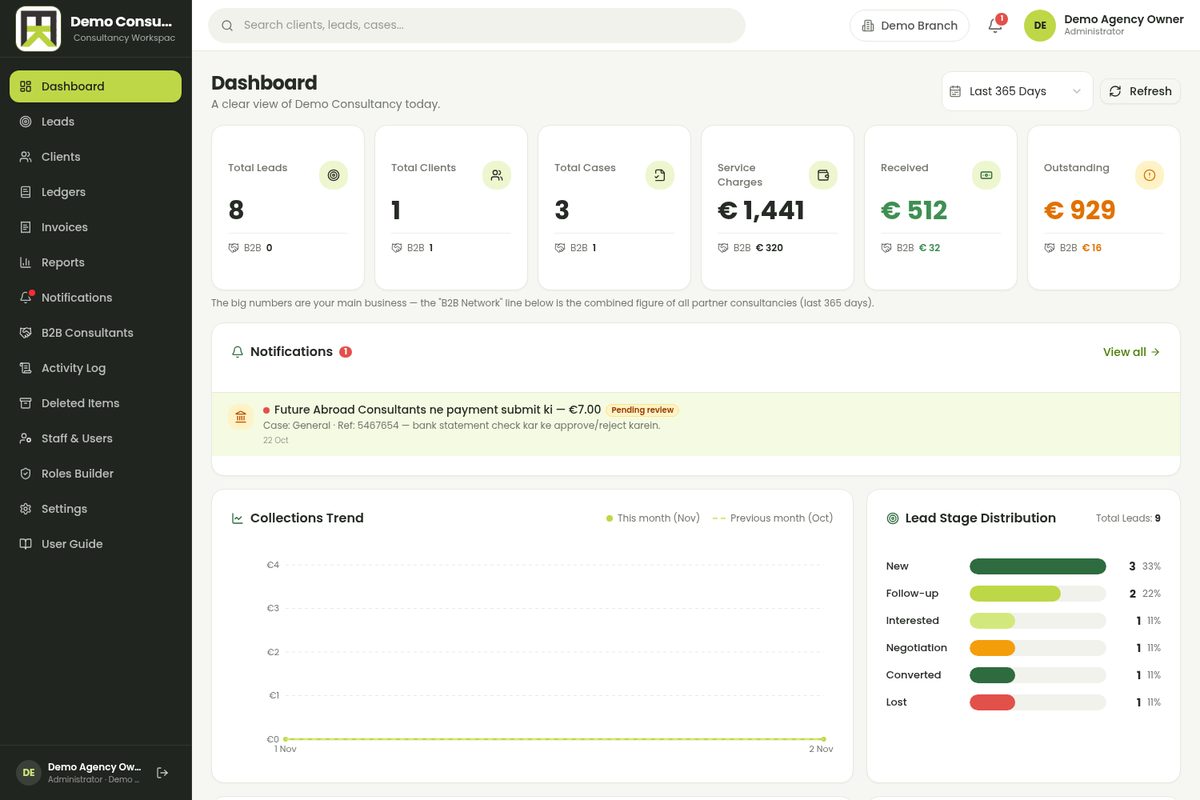
Consultancy CRM is built for firms that sell expertise: a lead pipeline that never forgets a follow-up, client and case records with documents, service-charge invoicing in PKR or foreign currency, and collections you can see at a glance.
Pipeline that moves
every lead has a stage & next step
Invoices under control
billed, received, outstanding
 Real product
Firms don't struggle to sign clients. They struggle after.
Consultants rarely lose sleep over winning projects — the chaos starts after the deal is signed: cases, documents, follow-ups, invoices and renewals spread across diaries, spreadsheets and WhatsApp. Consultancy CRM puts the entire client lifecycle on one record.
 Built for client-facing teams
Deals live in diaries and inboxes
A lead asks on WhatsApp Monday, emails Tuesday, calls Friday — and three counsellors each know one-third of the story. One pipeline holds every lead with stage, owner, next action and full history attached.
Invoices chase themselves
Service charges billed late, payments half-tracked, outstanding discovered at year-end. Generate invoices from the case record, see billed vs received vs outstanding live, and let reminders go out on schedule.
A signed client becomes new chaos
Documents in one drive, case notes in another head, renewals in nobody's memory. Every client gets one case board — documents, milestones, notes and the next review date — so handovers take minutes, not weeks.
Everything a services firm actually needs — nothing it doesn't
Leads, clients, cases, invoices and teams in one CRM — shaped by how consulting and services firms really work, not by a generic sales template.
Lead Pipeline
Custom stages from first enquiry to signed deal, with owners, sources and stage-conversion reporting.
Client Directory
One record per client: contacts, agreements, communication history and every case attached.
Case & Project Boards
Cases with milestones, checklists and review dates — counsellors always know the next step.
Invoices & Payments
Service-charge invoicing in PKR or foreign currency, partial payments, and a live outstanding ledger.
Service Catalogue
Your services with standard fees and durations — quotations and invoices build themselves from it.
Follow-up Reminders
Stage-based reminders so no enquiry cools down — today's calls and follow-ups on one screen.
Teams & Assignment
Round-robin or manual lead assignment, role-based access for counsellors and managers.
Revenue Reports
Collections trend, stage distribution and service-wise revenue — the owner's Monday meeting, ready.
…plus WhatsApp follow-ups, daily digests, quotation builder and audit logs.
Our weapon of choice
From scattered spreadsheets to one pipeline in two weeks
We shape the CRM around your stages and services, migrate your existing data, train the team and go live — with your real clients inside, not dummy records.
Step
01
Pipeline Design
Your stages, your words
Day 1-2Scroll to move through steps
Pipeline Design
Your stages, your words
A workshop to map how a client actually flows through your firm — enquiry, counselling, proposal, visa or delivery, closure — and turning that into pipeline stages, fields and follow-up rules.
What happens
- Stage map
- Custom fields
- Follow-up rules
Powered by
Data Migration
Spreadsheets in, clean data out
Your existing Excel sheets, diaries and WhatsApp histories become clean client records — deduped, staged and assigned to owners, so the team starts with today's reality, not a blank screen.
Services & Invoicing
Fees, taxes, currency
Service catalogue with your standard fees, invoice templates with your branding, tax settings, and multi-currency if you bill clients abroad — tested against real cases.
Team Onboarding
Counsellors in, day one
Every counsellor and manager gets a role, their live leads and their follow-up list. We run side-by-side with the old way for a few days so nobody is thrown in the deep end.
Reports & Reviews
Monday meetings, upgraded
Stage distribution, collections trend and outstanding aging become your weekly review pack — decisions made on numbers the CRM already counted, not on guesses.
 Consultancy CRM
If your product is expertise, this is your CRM
Built for firms where a person guides a client through a long, valuable process — and where one missed follow-up costs a real fee.
Frequently asked questions
Yes — that is step two of every rollout. Send your spreadsheets, diaries or export files; we clean, dedupe and import them as client records with their stages and owners. Migration happens before go-live, so the team starts with today's pipeline — not an empty one.
Still curious? See it live on your own data.
Book a Free Demo